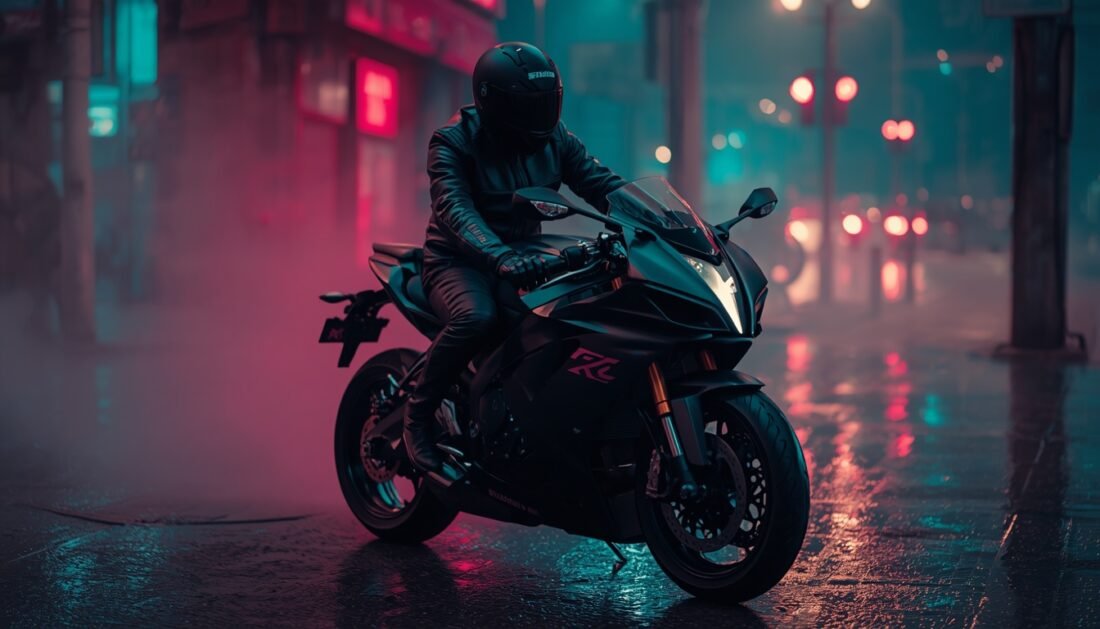
Neon Cyberpunk Bike Night
0 likes 0 copies 1 saves
Prompt
Cinematic photograph of a rider in a black leather jacket and helmet sitting on a matte black sports bike on a rainy neon-lit city street at night, pink and cyan reflections on wet asphalt, light mist, low angle, 35mm lens, shallow depth of field, moody teal and magenta colour grade, realistic metal and leather textures, no readable signs, no text, no watermark, vertical 9:16 frame
Tips for best results
- Keep "low angle" and "35mm lens" in the prompt to get the dramatic, cinematic bike view.
- Mention "matte black" clearly, otherwise many tools make the bike glossy.
- If the neon looks too strong, add "subtle neon glow" or "soft neon reflections".
- Add your bike type (e.g. "supersport bike") for a more accurate shape.
- In Midjourney, try --style raw --stylize 150 for a more realistic look.
- Generate 3-4 variations and pick the one with the best reflections on the road.
About this prompt
This prompt creates a moody, cinematic night scene of a lone rider on a matte black sports bike in a rain-soaked city. Pink and cyan neon lights bounce off the wet asphalt, while a light mist adds depth and atmosphere. The low camera angle makes the bike look powerful and dramatic, and the shallow depth of field melts the background into soft, glowing bokeh. The teal and magenta colour grade gives it a classic cyberpunk feel, while realistic leather and metal textures keep it grounded. It works well for phone wallpapers, bike-themed social media posts, album covers and sci-fi concept art. Try it in Midjourney, Gemini or ChatGPT image generation for the best results.
How to use this prompt
- Tap Copy prompt to copy the full text.
- Open Leonardo AI in your browser or app.
- Paste the prompt into the message box.
- Generate. If the result is off, change one detail at a time, such as the outfit, light or background.